
Threads Downloader
Paste a Threads post URL to load its media and download the available files in a couple of clicks.
Paste a Threads post URL to load its media and download the available files in a couple of clicks.

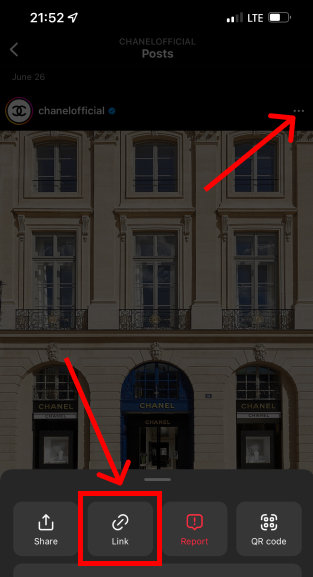
Open the post, tap Share, and copy the post link.
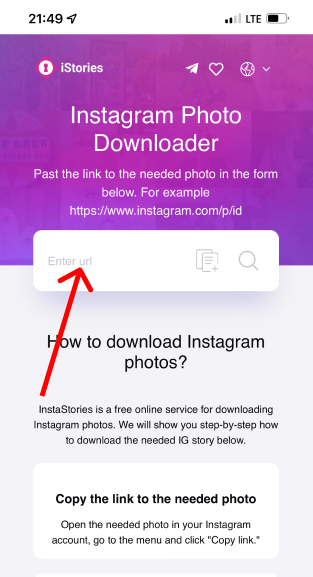
Paste the copied URL into the field above.
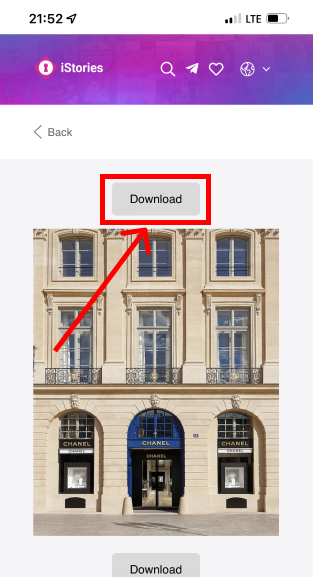
Click “Download” and save the file in the available quality.
Threads is great for sharing, but it does not always provide a direct download button for every media type. This tool helps you save videos, images, and GIFs from public posts using just a link.
Paste a post URL, we fetch the media sources for that post, and then show the downloadable files. The exact formats and quality depend on the original upload and the platform’s processing.
Private profiles and restricted posts are not supported. We don’t host the content — we only provide direct download links to the files served by the platform.
When you paste a link, the downloader analyzes the public post page and finds the media URLs available for that content.
We then display the available items so you can download the one you need. What you see depends on the post (video, image, or multiple files).